

Bad Robot: A Hard Lesson in Disaster Recovery
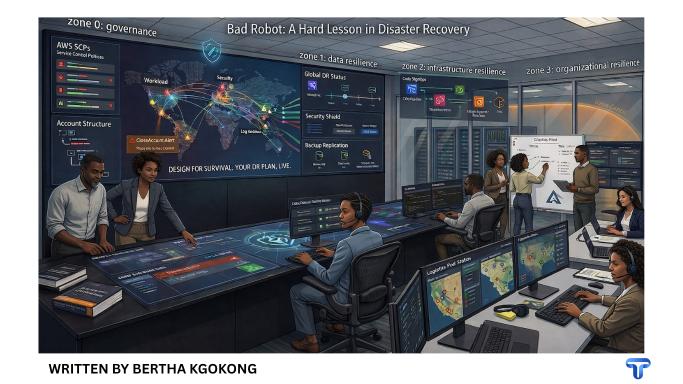
A multi-layer disaster recovery plan for the age of over-trusted humans, hacked identities, and AI with API keys
A bad robot is not always a robot.
Sometimes it is a disgruntled employee. Sometimes it is a compromised admin account. Sometimes it is a contractor with yesterday’s access and today’s attitude. Sometimes it is an AI assistant that was given production credentials because “it’s just helping.” The label is less important than the blast radius.
That is why the recent Amazon/Kiro headlines were useful, even if the public reporting got messy. Amazon said one AWS interruption widely blamed on AI was actually caused by user error and misconfigured access controls, not AI itself. In a separate Amazon retail incident, Amazon said an engineer followed inaccurate advice inferred by an AI tool from an outdated internal wiki. Different story, same lesson: once production access is too broad, the difference between “human mistake,” “tool mistake,” and “governance failure” gets very academic very quickly.
And this is not a niche problem. IBM’s 2025 breach research says the global average cost of a data breach is $4.4 million. It also found that 63% of organizations lacked AI governance policies, and among organizations that reported an AI-related security incident, 97% lacked proper AI access controls. Verizon’s 2025 DBIR analyzed 22,052 incidents and 12,195 confirmed breaches, found the human element hovering around 60% of breaches, third-party involvement doubling from 15% to 30%, and ransomware present in 44% of breaches. Uptime Institute found 54% of respondents said their most recent serious outage cost more than $100,000, 16% said more than $1 million, and four in five said the outage could have been prevented with better management, processes, and configuration.
So yes, build governance. Build least privilege. Build monitoring. Build alarms. Build SCPs. But when the bad robot slips through the cracks, disaster recovery is the last line of defense between your business and a very awkward return to spreadsheets, WhatsApps, and prayer.
Layer 0: Governance first, because recovery is expensive
Before we talk about restoring anything, say this out loud: production is not a trust fall.
AWS Service Control Policies are useful because they act as organization-wide guardrails on the maximum permissions IAM users and roles can have. They do not grant permissions; they limit them. That matters because “we accidentally gave it admin” is not a strategy. In parallel, AWS Control Tower’s multi-account model exists for a reason: AWS explicitly recommends separating workloads across multiple accounts because accounts are isolation boundaries and reduce blast radius when things go wrong. Control Tower also creates a dedicated log archive account so logs from member accounts are collected centrally.
Bad Robot hates paperwork. Give it paperwork anyway.
If your organization uses AWS Organizations, do not assume account deletion is only a root-user problem. AWS Prescriptive Guidance notes that users with access to the Organizations management account can call CloseAccount and RemoveAccountFromOrganization, which is why AWS provides a pattern to alert on those API calls with CloudTrail, EventBridge, Lambda, and SNS. In other words, if someone tries to make an account disappear, you want that event screaming at you before your morning coffee is ready.
Governance reduces the odds of catastrophe. DR reduces the cost when governance loses.
Scenario 1: Bad Robot corrupts your database and asks for Bitcoin
This is the classic villain monologue. Your database is full of garbage, the ransom note is full of confidence, and the board is suddenly very interested in backup retention policies.
Verizon found ransomware in 44% of breaches in 2025, up from 32% the year before. Sophos reported exploited vulnerabilities as the number one root cause in its 2025 ransomware study, said 63% of victims attributed the incident in part to lack of people or skills, put the average ransom payment at $1.0 million, and the average recovery cost at $1.5 million. That is a lot of money to discover your “backup strategy” was actually a vibes strategy.
The first rule here is simple: do not recover in place unless you absolutely must.
A corrupted production database is a crime scene. Preserve evidence. Figure out the entry point. Rotate compromised credentials. Lock down access. Then restore to a clean target from a known-good point in time, validate it, and cut over deliberately. The point is not just to get data back. The point is to get back to a trustworthy state.
AWS gives you several time-travel tools for this. Amazon RDS supports restore to a specified point in time. DynamoDB point-in-time recovery provides continuous backups with up to 35 days of recovery points at per-second granularity, and the restore goes to a new table, which is exactly what you want when the current one may be poisoned. S3 Versioning lets you recover from accidental deletion and overwrite, while S3 Object Lock adds WORM-style protection so objects cannot be deleted or overwritten for a fixed period or indefinitely.
But here is the part people skip: your backups must live outside the blast radius of the compromised account.
AWS Backup supports cross-account copies inside an AWS Organization, re-encrypts the copy with the destination vault’s customer-managed key, and can copy across Regions. AWS’s DR whitepaper explicitly says cross-account backup helps protect against insider threats or account compromise. If you add AWS Backup Vault Lock in Compliance mode, then after the grace period the vault and its contents cannot be altered or deleted by the customer, the account owner, or even AWS while recovery points remain. Even the root user gets denied if they try to delete backups in a locked vault. That is the kind of bureaucratic stubbornness you want from infrastructure.
So the practical pattern looks like this:
Your production account writes backups. A separate backup account receives copies. A separate Region receives copies. Your backup vault is immutable. Your restore process is tested. And your cutover runbook tells you exactly how to restore the app to the last known good point before Bad Robot learned cryptocurrency vocabulary.
Scenario 2: Accidental deletion of the database
This is the less cinematic cousin of ransomware.
No ransom note. No ominous message. Just one DROP, one wrong click, one overly enthusiastic script, and suddenly the database has achieved enlightenment and detached itself from the material plane.
The response pattern is almost the same as corruption, except with more embarrassment and fewer legal briefings.
Restore from point in time. Validate data integrity. Reconnect the application. Then fix the control failure that allowed one person, one script, or one agent to delete something that important without a second human, a time delay, or a policy guardrail in the way. AWS’s DR guidance explicitly recommends S3 versioning as a mitigation for human-error disasters and says you must back up not only data but also the configuration and infrastructure needed to redeploy the workload.
Bad Robot does not always kick down the door. Sometimes it just has delete privileges and poor impulse control.
Scenario 3: “The CTO went on leave, and the little ones touched the infrastructure”
This one is not a breach. It is worse. It is drift.
The CTO goes on leave for a month because life happened. The team keeps shipping. A subnet gets changed here. A security group gets “temporarily” widened there. A queue is added. An ALB is repointed. A sidecar appears. An old EC2 box survives three redesigns out of spite. Costs start climbing. Diagrams stop matching reality. Eventually even the people who made the changes begin speaking about the platform in archaeological terms.
This is how infrastructure becomes folklore.
AWS CloudFormation drift detection exists precisely because unmanaged changes outside CloudFormation complicate updates and deletions. AWS’s DR whitepaper says you must back up configuration and infrastructure as well as data, and that CloudFormation lets you define resources as code so you can reliably deploy and redeploy across multiple AWS accounts and Regions. In other words, the answer to “can we restore the whole system back to when things were cool?” is yes — but only if “when things were cool” was committed to version control and not trapped in Kevin’s memory.
A mature drift-recovery pattern has three parts.
First, your desired state lives in Git, not in people. Terraform, CloudFormation, CDK — pick your religion, but commit to one.
Second, your deployable artifacts live outside the workload account. If your only copy of the golden image, the build artifact, or the app config sits inside the account you are trying to recover, that is not DR. That is self-sabotage with extra steps.
Third, you regularly compare reality to desired state. Run drift detection. Review config history. Tag known-good releases. Keep a restore point for infrastructure the same way you keep one for data.
Because when the CTO returns, “we can explain” is not nearly as useful as “we can roll back.”
Scenario 4: Bad Robot deletes the entire AWS account
Now we are in proper disaster territory.
You wake up. The whole workload account is gone. Web tier, app tier, data tier, IAM roles, pipelines, dashboards, the lot. If you stored everything in one account because “it was simpler,” this is the part where simple becomes expensive.
There is one small mercy. AWS says a closed account can be reopened within 90 days of closure. During that post-closure period, AWS Support can reopen it. After 90 days, AWS permanently closes the account and deletes the content and resources in it. So step one is immediate triage: determine whether the account was closed and is still recoverable, and open the support case fast.
But your DR plan must assume the worse outcome: the account is gone for good, or cannot be trusted even if it comes back.
That means you do not restore “the account.” You rebuild the workload from independent sources of truth.
For a three-tier application, that means:
Your code should live in a source control system outside the workload account.
Your container images and artifacts should be replicated out of the workload account. Amazon ECR supports both cross-Region and cross-account replication, so the clean recovery account can pull trusted images without needing the dead account to cooperate.
Your data should already exist in cross-account and cross-Region backups. AWS Backup supports that, and AWS explicitly positions cross-account backup as protection against insider threat and account compromise. For databases, use PITR or replicated data where appropriate. For S3, use versioning and immutable protection where necessary.
Your secrets and configuration must not have only one home. AWS Secrets Manager supports multi-Region replication, which is useful for DR, but the broader design principle is more important: bootstrap secrets, break-glass credentials, and recovery instructions must live outside the workload account’s blast radius.
Your logs should be centralized. AWS Control Tower’s log archive account is valuable here because it stores logs from all shared and member accounts centrally, giving you a forensic trail even if the workload account is unavailable or hostile.
Your network entry points should be survivable. AWS’s DR guidance recommends Route 53 or Global Accelerator for failover traffic management. The practical implication is that DNS and traffic-control mechanisms should not be trapped in the same workload account that just vanished. Keep the steering wheel somewhere safer than the car that caught fire.
This is where Control Tower and a multi-account strategy earn their keep. AWS explicitly describes accounts as isolation boundaries and a way to reduce blast radius. If your management, security, log archive, shared services, backup, and workload accounts are separated properly, the bad robot can delete one kingdom without deleting the map.
And yes, you should absolutely alert on account-closure attempts in the Organizations management account. Because the best time to discover somebody called CloseAccount is not during your incident postmortem.
The DR stack that actually survives Bad Robot
A serious DR design is layered.
Layer one is governance: least privilege, SCP guardrails, separate accounts, peer review, and monitoring.
Layer two is data resilience: point-in-time recovery, immutable storage, cross-account backups, and cross-Region copies.
Layer three is infrastructure resilience: infrastructure as code, versioned config, golden images, artifact replication, and drift detection.
Layer four is organizational resilience: tested runbooks, game days, clear ownership, offboarding discipline, and independent control planes for logs, backups, secrets, and traffic routing.
If one layer fails, the next one catches the fall.
That is the difference between a bad day and a company obituary.
Security tips that target the human weak link
1. Replace phishable logins with phishing-resistant ones
FIDO says passkeys are currently the only practical phishing-resistant option for consumers, and explicitly classifies SMS OTPs, email OTPs, push approvals, and recovery codes as phishable methods. Microsoft now treats phishing-resistant MFA as the new baseline and says traditional MFA methods such as SMS, email OTPs, and push notifications are increasingly bypassed through phishing, man-in-the-middle attacks, and MFA fatigue.
Translation: stop pretending push spam is a personality test. Move privileged users to passkeys or hardware-backed FIDO2 methods.
2. Stop running automation on human identities
Microsoft’s guidance explicitly recommends migrating user-based automation and service accounts to workload identities. IBM likewise recommends strong operational controls for non-human identities and unmanaged credentials. If your CI/CD runner, chatbot, or “helpful” AI agent is borrowing a human identity, you are building tomorrow’s incident report today.
3. Treat secrets like dairy products, not heirlooms
GitGuardian found 23.8 million secrets leaked on public GitHub in 2024, up 25% year over year. It found 70% of secrets leaked in 2022 were still active in 2025, 35% of private repositories contained plaintext secrets, and AWS IAM keys appeared in 8% of private repositories. Verizon’s DBIR says the median time to remediate leaked secrets discovered in GitHub repos was 94 days. Ninety-four days is not remediation. That is a seasonal residency program for attackers.
So ban credential sharing in chat. Ban secrets in wikis. Ban “just for now” tokens in code. Rotate aggressively. Prefer short-lived credentials. Scan repos, tickets, Slack, and container images. Bad Robot loves documentation.
4. Put two humans in the loop for destructive actions
Amazon said one safeguard it added after the AWS incident was mandatory peer review for production access. That is a good instinct. Destructive actions should require separation of duties, not a single sleepy operator and a dropdown menu. Apply that principle to backup-vault policy changes, KMS deletions, account closures, security-boundary edits, and root-level break-glass use.
5. Make offboarding part of incident response
You do not “process HR paperwork” when a high-privilege admin exits. You execute a security event.
Revoke sessions. Rotate shared credentials. Review service accounts they created. Review CI/CD access. Remove access from AI tools, scripts, browser-stored federated sessions, password managers, and chat-integrated bots. Uptime’s research found 39% of respondents reported outages caused by human error over the past three years, and the most common causes included staff failing to follow procedures and incorrect processes. Your offboarding procedure is either a control or a vulnerability.
6. Run game days until your runbooks become boring
AWS’s own DR guidance says to automate every step you can and define regular failover tests to ensure expected RTO and RPO are met. The AWS DR workshop says it even more bluntly: an untested DR strategy is no DR strategy.
Test the ugly scenarios, not just the pretty ones.
Test “restore the database to 17 minutes before corruption.”
Test “rebuild the app in a fresh account.”
Test “the backup account is fine but the workload account is hostile.”
Test “the person who usually does this is on leave.”
If the only time you run the recovery plan is during a real outage, the bad robot has already won round one.
Final thought: design for survival, not optimism
The bad robot is coming.
Maybe it arrives as ransomware. Maybe as a bad deploy. Maybe as a stale API key in a private repo. Maybe as a fired admin with fresh emotions. Maybe as a well-meaning AI agent that should never have been anywhere near production in the first place.
Your job is not to guess the costume.
Your job is to make sure that when the bad robot finally gets a turn, it cannot take your business back to the stone age.
That means governance up front, immutable backups behind it, versioned infrastructure beneath that, and a full rebuild plan underneath everything. Because in cloud operations, resilience is not the ability to avoid every mistake.
It is the ability to survive the ones that matter.